Settings reference#
Updated October 19, 2026 For installers
All parameters are changed on the configuration website, Settings tab. Some of them can also be changed with the Service button ("Menu" column), and some the owner changes in the Gardix app ("App" column).
Parameter names are given exactly as on the English version of the website.
Before turning on functions marked CAN, check on the Opportunities tab that the function is supported for this car.
Connection#
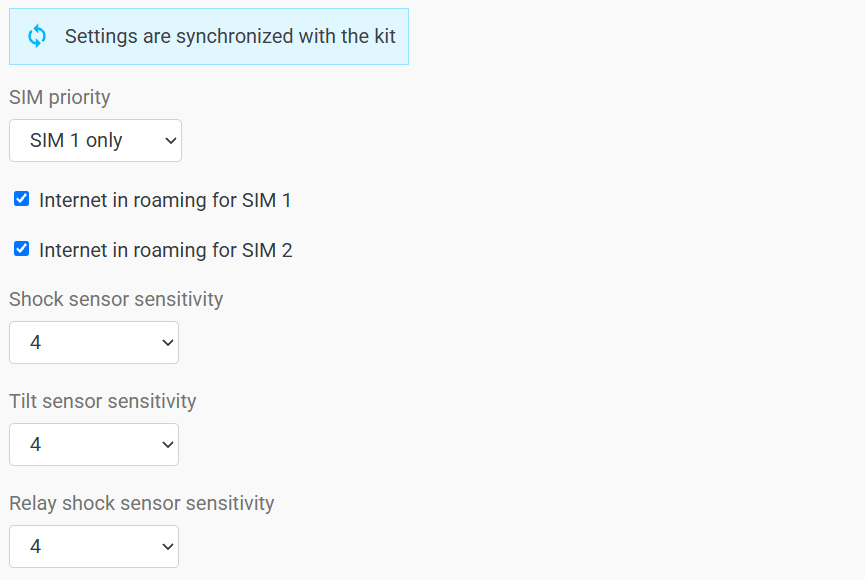
| Parameter | Default | Values | Menu | App |
|---|---|---|---|---|
| SIM priority | SIM 1 only | SIM 1 · SIM 2 · equal priority · SIM 1 only · SIM 2 only | 12 → 19 | — |
| Internet in roaming for SIM 1 | On | On · Off | 12 → 20 | — |
| Internet in roaming for SIM 2 | On | On · Off | 12 → 21 | — |
SIM modes:
- SIM 1 / SIM 2 — DUAL-SIM with priority for the selected card. If the priority SIM card loses connection, the unit switches to the other one, and returns to the priority card when the connection is restored.
- equal priority — DUAL-SIM. The unit works on the active card and switches to the other one only when the connection is lost.
- SIM 1 only / SIM 2 only — the unit uses only one card.
Sensors#
| Parameter | Default | Values | Menu | App |
|---|---|---|---|---|
| Shock sensor sensitivity | 4 | Disabled, 1–8 | 8 → 1 | yes |
| Tilt sensor sensitivity | 4 | Disabled, 1–8 | 8 → 2 | yes |
| Relay shock sensor sensitivity | 4 | Disabled, 1–8 | — | — |
The higher the value, the more sensitive the sensor. While armed, the unit constantly measures acceleration along three axes. A shock is a sharp acceleration; a tilt is a change in the body angle (tow truck, jack).
Relay sensor. The AirRelay relay has its own accelerometer. If the central unit is off, the relay switches to autonomous mode and turns on blocking by itself when it detects movement. Disabled turns off autonomous blocking.
After installation, check that the sensors trigger and choose the threshold.
Main functions#
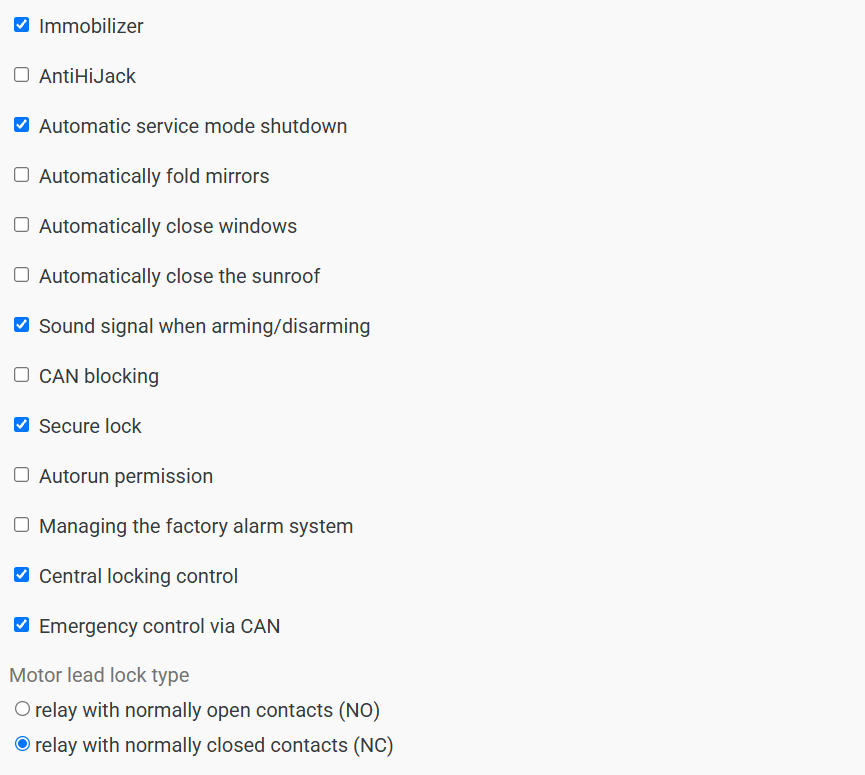
| Parameter | Default | Menu | App | Description |
|---|---|---|---|---|
| Immobilizer | On | 12 → 17 | — | Blocks the car from moving without authorization with an AirID tag or a PIN code |
| AntiHiJack | Off | 12 → 18 | — | Protection against carjacking. See below |
| Secure lock | On | — | — | Safe blocking: it takes effect only once the speed drops to 0 km/h |
| CAN blocking · CAN | Off | 12 → 9 | — | Blocking the car from moving over the CAN bus, with or without additional relays |
| Motor lead lock type | NC | — | — | Wired engine blocking relay type. NC (relay with normally closed contacts): the circuit is normally closed, and the unit opens it to block. NO (relay with normally open contacts): the unit closes the circuit to allow the engine to run, and opens it to block |
| Automatic service mode shutdown | On | 12 → 16 | yes | Service mode turns off by itself after 10 km |
| Sound signal when arming/disarming | On | 12 → 7 | yes | 1 short beep when arming, 2 when disarming |
| Autorun permission | Off | 12 → 8 | — | Lets the owner start the engine remotely (autostart) |
| Central locking control · CAN | On | 12 → 11 | — | Locking and unlocking with arming commands |
| Emergency control via CAN · CAN | On | 12 → 10 | — | Controlling the hazard lights over the CAN bus |
| Managing the factory alarm system · CAN | Off | 12 → 12 | — | Controlling the factory alarm when arming and disarming from the app |
| Automatically close windows · CAN | Off | 12 → 13 | — | When arming |
| Automatically fold mirrors · CAN | Off | 12 → 14 | — | When arming |
| Automatically close the sunroof · CAN | Off | 12 → 15 | — | When arming |
AntiHiJack#
Once the driver has been authorized and has closed the doors, the system waits for the car to start moving. As soon as the car moves off, a 20-second timer starts. After it, the authorization is reset and sound warnings play. If the driver doesn't authorize again with an AirID tag or a PIN code, the system blocks the car from moving and the car stops.
Explain AntiHiJack to the customer
If the function is on, a driver without a tag has to enter the PIN code again every time the doors are closed and the car starts moving.
Digital outputs#
The inputs and outputs on the tab are grouped by connector: Connector 1 (18-pin) is X1, Connector 2 (10-pin) is X2. Each row shows:
- the pin number and wire color, as in the connector pinouts;
- the polarity: the active + or − button is highlighted;
- the function selected from the list.
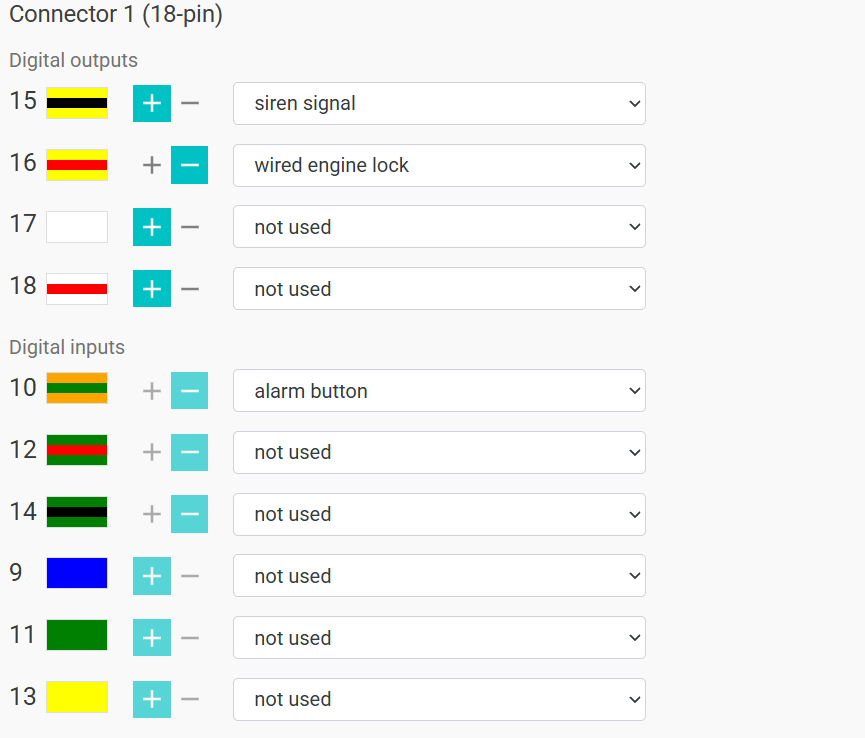
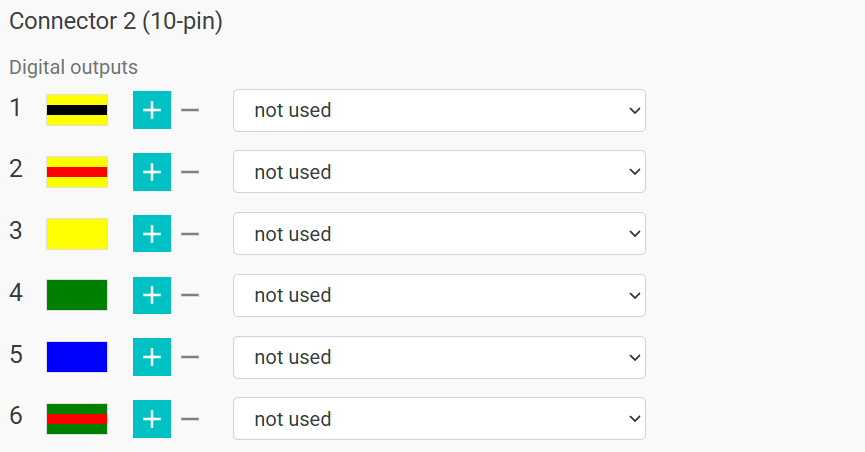
Select the function of each output from the list, and switch the polarity with the + / − buttons.
| Function | How the output works |
|---|---|
| not used | Off. Set it for all unused outputs |
| "Protection" status | Active while the car is armed |
| pulse when "Security" is turned on | 0.8 s pulse every time the car is armed |
| pulse when disarming "Security" | 0.8 s pulse every time the car is disarmed |
| pulse during user authentication | 0.8 s pulse on every successful authorization |
| pulse when turning on "Security" from the application | 4 s pulse, only if the car is armed from the app (not with the standard key or keyless entry) |
| pulse when turning off "Security" from the application | 4 s pulse, only if the car is disarmed from the app |
| Impulse for closing windows when arming | 10 s pulse every time the car is armed |
| siren signal | Controls the siren |
| horn signal | Controls the horn |
| trunk | Active while the trunk is open |
| ignition | Active while the ignition is on |
| wired engine lock | Controls the wired blocking relay |
| autostart status | Active while autostart is running |
| Autostart: Starter | Starter signal during autostart |
| Autostart: Ignition 1 / Autostart: Ignition 2 | Ignition signals during autostart |
| Autostart: Accessories | "Accessories" signal during autostart |
| Emergency impulse control | Pulse control of the hazard lights |
| Emergency control with exit hold | Status control of the hazard lights (the output is held) |
| video recorder | Dashcam. Active while the ignition is on. During an alarm while armed, it turns on and turns off after 5 minutes |
| activation after the tag disappears | Turns on if, after arming, the AirID tag is out of the detection range for more than 30 s. Turns off when the tag appears |
Activation after the tag disappears
The function is still being improved: tag detection may be delayed, and so may turning off the output.
Digital inputs#
| Function | When to use |
|---|---|
| not used | Set it for all unused inputs |
| brake light status monitoring | The brake pedal signal isn't available from the CAN bus |
| hood position control | The hood signal isn't available from the CAN bus |
| ignition control | The ignition signal isn't available from the CAN bus. If this function is assigned to at least one input, reading the ignition from CAN stops |
| drotova button | Wired button: standard button presses for authorization aren't available from the CAN bus |
| temporarily disabling the alarm to create an autostart | The car has a third-party autostart module: security functions are turned off while it runs |
| alarm button | Connecting a panic button. Pressing it sends an alarm notification to the owner |
| additional security sensor input | Connecting an additional sensor. Its triggering sets off the alarm |
Input polarity is fixed and can't be switched: the row highlights only the + or − button that the input responds to. So choose an input with the polarity you need.
Analog inputs#
The Analog input connection type parameter; by default, resistive (steering wheel) buttons.
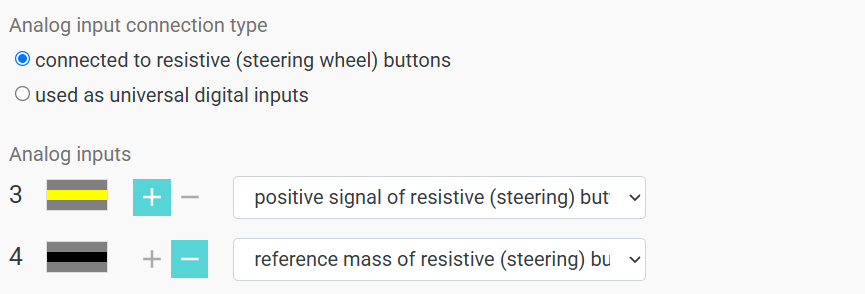
| Value | How inputs 3 and 4 of connector X1 work |
|---|---|
| connected to resistive (steering wheel) buttons | Reading the standard resistive buttons for authorization. One input is the button signal (positive signal of resistive (steering) buttons), the other is the buttons' reference ground (reference mass of resistive (steering) buttons) |
| used as universal digital inputs | Work as regular digital inputs with all the functions in the list above |