Firmware update#
Updated October 15, 2026 For installers
Before handing over the car to the customer, update all security system devices to the current firmware version: the central unit, the Bluetooth module, each AirID tag and each AirRelay relay. Updates are done on the configuration website, Devices tab. On the website, the firmware update button is called Stitch.
General rules#
- One at a time. Only one device can be updated at a time. Wait for the update to finish before starting the next one. The update order doesn't matter.
- Ignition. For safety reasons, the central unit and Bluetooth module update won't start until you turn off the ignition. For the AirID tag, the ignition state doesn't matter, while the AirRelay relay, on the contrary, updates only with the ignition on. See the table below.
- Error — repeat. If an error occurs during the update, start the update of that device again.
How to update a device#
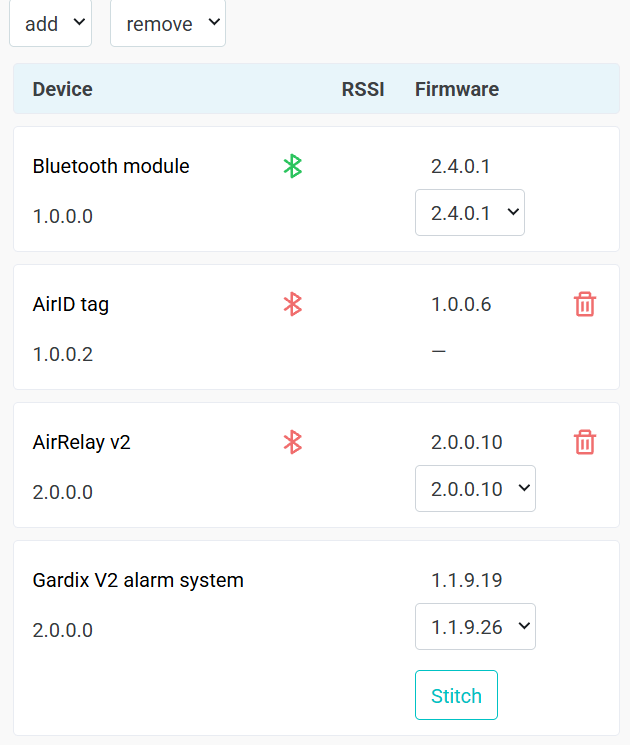
In the example, an update is available for the Gardix V2 alarm system unit: the current version is 1.1.9.19, the list shows the new version 1.1.9.26 and the Stitch button. The other devices already have the current version.
- Connect to the unit on the configuration website and open the Devices tab.
- Find a device with the Stitch button: an update is available for it.
- Prepare the device as described in the table below.
- Click Stitch. The website offers only one, current firmware version, so you don't need to choose a version.
- Wait for it to finish. After a successful update, the new version becomes the main one and the Stitch button disappears.
- Repeat for the next device with the Stitch button.
The update is complete when there is no Stitch button next to any device.
Requirements for each device#
| Device | Before updating | Duration | After updating |
|---|---|---|---|
| Central unit (Gardix V2 alarm system) | Turn off the ignition | ≈ 2 min | The unit restarts. The new version is visible after the restart |
| Bluetooth module | Turn off the ignition | ≈ 2 min | The module restarts separately from the unit |
| AirID tag | The tag must be within range of the car, preferably inside it. Any ignition state | 2–8 min | The new version becomes the main one |
| AirRelay relay | Turn on the ignition or start the engine | 2–8 min | Turn the ignition off and on again: the relay installs the new firmware when it powers up |
Relay: connect a battery charger
The AirRelay relay is powered from the ignition, so it updates only with the ignition on or the engine running. The update takes up to 8 minutes: if the engine isn't running, connect a charger to the car battery so it doesn't run down.
Other actions that require the ignition off#
Like the unit and Bluetooth module update, for safety reasons, the website won't do the following while the ignition is on:
- selecting the car make, model and configuration;
- saving settings on the Settings tab.