Installing Gardix Connect#
Updated October 14, 2026 For installers
Mounting location requirements#
- Install the central unit inside the passenger compartment.
- No liquids or foreign objects must get into the housing.
- The unit and cables must not be exposed to strong mechanical stress.
- Fasten the unit securely and tightly to the body or to structural load-bearing parts. The built-in shock, tilt and motion sensors depend on it.
Output current
Don't exceed the permitted output current (330 mA for most outputs, 1500 mA for pin 15 of connector X1 and pin 1 of connector X2; see Connectors). For autostart power circuits, use relay modules or load relays, wire of a suitable cross-section and fuses.
Installation steps#
- Open the central unit housing and insert the SIM card from the kit into the SIM 1 slot as shown on the board. Close the housing.
- Connect power to the unit.
- Open the configuration website and connect to the unit by IMEI.
- Turn off the ignition, select the car make, model and configuration, and save. The website won't save your selection while the ignition is on.
- On the Connection points tab, review the recommendations for this car: CAN1 and CAN2 connection, additional connections, how autostart is implemented.
- On the Opportunities tab, check which read signals and CAN control commands are supported.
- If reading the standard buttons from the CAN bus isn't supported, connect the buttons:
- resistive (steering wheel) buttons to the analog inputs;
- buttons with a positive or negative signal to the digital inputs.
- If the kit includes an AirRelay relay, find the blocking circuit in the car wiring.
- Do the installation. The AirRelay relay is powered by the ignition signal.
- Assign one of the standard buttons as the Service button.
- Add the AirRelay relays and AirID tags.
- Update the firmware of all devices on the Devices tab: the unit, the Bluetooth module, each AirID tag and each AirRelay relay. Devices are updated one at a time.
- Check that everything works on the Signal monitor tab in test mode.
- Fill in the Installation locations tab: VIN, service station, location of the unit, relay and Service button.
- Hand over the Customer Card to the owner and tell them which button is the Service button, which buttons can be used for the PIN code, and the SIM card numbers.
Before handing over the car
Remind the owner that the default PIN code is two presses of the Service button, and show them how to change it: How to change your PIN code.
Wiring diagram#
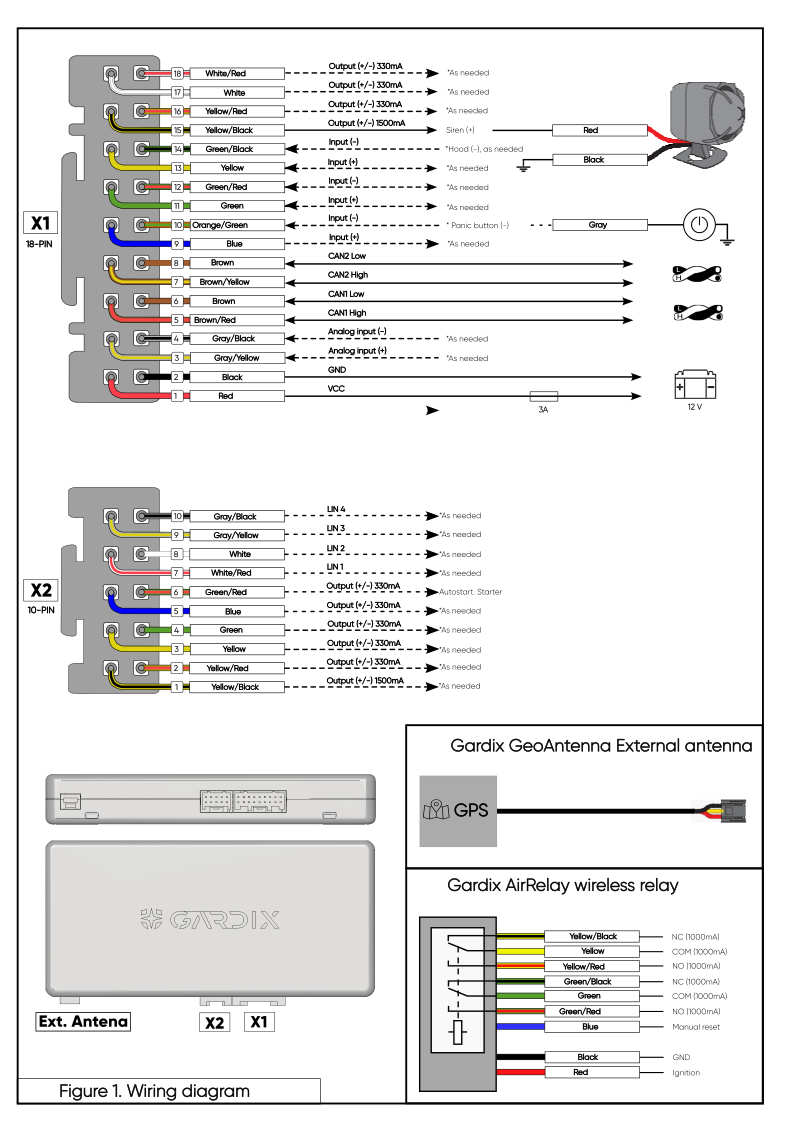
Click the diagram to open it full size: it's a vector image and stays sharp when zoomed in. Pin functions are described in Connectors. Autostart connection for Toyota, Lexus and Hyundai is described in Autostart.